Effortless team rotations
Create and share recurring team responsibilities in under 30 seconds. No login required*. FREE!
*Login needed to claim rotations and enable email reminders.
- Marek Pager went off at 2am. Who's on call this week?
- Inés I thought Jonas swapped with you?
- Jonas That was last sprint 😅
- Marek So... nobody?
- Inés rotahog.com Primary on-call This week: Marek Next week: Inés
- Marek Fine. Putting the coffee on ☕
Create your rotation
Teams at these companies use RotaHog

One link, and everyone sees the same answer
RotaHog turns your list of names into a schedule that rotates evenly, then gives you a link to drop in the group chat. Nobody keeps a spreadsheet, and nobody has to remember who went last.
- Turns go round in order, so everyone does the same number
- Daily, weekdays only, weekly, every two weeks or monthly
- Skip a date or have someone cover a turn without breaking the order
- Mon, Nov 23PriyaUp next
- Tue, Nov 24Tom
- Wed, Nov 25Sofía
- Thu, Nov 26Priyacovering for Sam
- Fri, Nov 27Sam
The person whose turn it is gets told
Add an email next to a name and RotaHog reminds them before their turn. On a paid plan the reminder can land in Slack instead, with buttons to mark it done or find someone to cover.
How Slack reminders work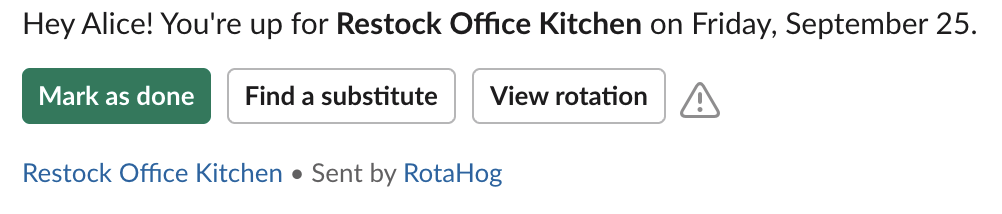
Set it up before your coffee cools
-
Name the task
Standup host, on-call, opening the front desk. Pick how often it repeats and when it starts.
-
List who takes turns
Names, one per line. Add emails if people should get reminders.
-
Share the link
Post it in the group chat. Sign in with Google to keep the rotation and switch on reminders.
What teams rotate
Pick one to fill in the form.
💻 Tech teams
🏥 Healthcare
🎓 Education
🏢 Office teams
🛍️ Retail and hospitality
⚖️ Professional services
🏛️ Nonprofits and NGOs
🍽️ Restaurants
👫 Couples and roommates
Before you ask
Something else? Write to me.
Is it free?
Yes. The free plan covers 2 rotations of up to 5 people each, with email reminders. Paid plans start at $19 a year and add more rotations, larger teams, Slack, swaps and the API. See pricing.
Does everyone on the rotation need an account?
No. Anyone with the link can see the schedule. Only the person who sets it up signs in, with Google, to keep the rotation and turn on reminders.
What happens when someone is on holiday?
On a paid plan you can skip that date or pick someone to cover the turn. The rest of the order stays as it was.
Can it skip weekends?
Yes. Choose "Every weekday (Mon-Fri)" and turns only land on working days.
Does it work with Slack?
Yes, on paid plans. Reminders arrive in Slack with buttons to mark the task done or find a substitute.
Settle whose turn it is before the next meeting
Thirty seconds, no spreadsheet, nothing to install.
Create your rotation