Track task completion in your rotation
Published on: September 27, 2026, by: João Alves
A rotation tells you who's next. But until today, it couldn't tell you whether the task actually got done.
We used to mark turns as "completed" automatically once the date passed. That was a lie. The date passing doesn't mean someone restocked the kitchen, led the standup, or took out the trash. It just means yesterday became yesterday.
Starting today, "completed" means someone confirmed they did the work.
How it works
When your turn comes up and you've done the task, click "Done". That's it. The turn flips to completed (green badge), and the next person in the rotation becomes active.
If the scheduled date passes and nobody marks it done, the turn moves to overdue (yellow badge). It stays there until someone acts on it. No more pretending things got done just because time moved forward.
Both the rotation owner and the assigned person can mark a turn as done. You don't need to be the admin to confirm your own task.

Completion windows
Sometimes you want more control over timing. Maybe your weekly kitchen restock can be done a few days early. Maybe you want overdue tasks to eventually clear themselves so the queue doesn't get stuck.
Rotation admins on the Team Toolkit or Ops Pro plan can now configure two settings:
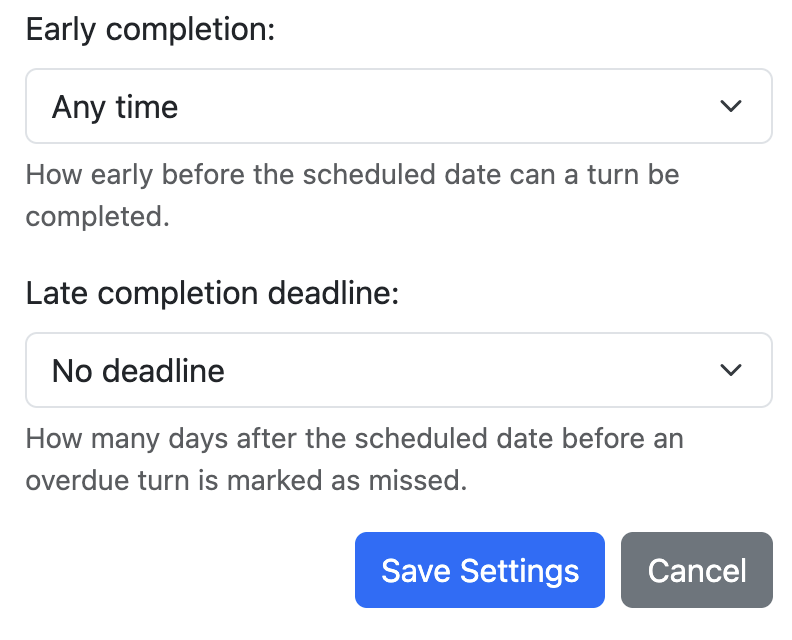
- Early completion window — how many days before the scheduled date a turn can be marked done. "Same day" means no early completion. "Any time" means the assigned person can mark it done whenever they're ready.
- Late completion deadline — how many days after the scheduled date before an overdue turn is automatically marked as missed (dark badge). This prevents one forgotten task from blocking the entire queue.
The options adapt to your rotation's frequency. A daily rotation won't offer "1 week before" as an early window, because that doesn't make sense. Monthly rotations get wider ranges.
What happens to missed turns
When a turn is marked as missed, the rotation moves on. The next person's turn becomes the active one. No more waiting for someone who forgot.
But missed doesn't mean gone. The rotation owner can retroactively mark a missed turn as completed. If someone did the task but forgot to click "Done," the admin can fix the record.

The status flow
Here's how a turn moves through its lifecycle:
Free plan users get the core flow: mark turns as done on the scheduled day, and overdue turns stay overdue until completed. Completion windows and the missed auto-transition are available on paid plans.
Why this matters
Rotations are about accountability. Knowing who's next is only half the picture. Knowing whether they followed through is what turns a schedule into a system you can trust.
Try it on your next rotation. Create one, assign your team, and see the "Done" button appear when it's your turn.
Create a Rotation